8-load-balancing.mdx
3 min read
Networking
Load Balancing
By Haffi Mazhar · 3 min read
What is a load balancer?
As an application scales, a single server is not enough. A single server means a single instance serving all requests. Eventually as the request throughput demands increase, a single instance simply doesn't have the resources available to serve all the requests. We can vertically the server meaning increase the CPU and RAM available however this becomes difficult to maintain and there is a eventually a hardware limit.
The alternative approach is to horizontally scale your single server into multiple instances. Therefore, distributing the workload.
This results in:
- Eliminating latency if there was any since each instance is likely to be starving for resources. Just overall better performance.
- Eliminating a single point of failure. What happens if your single server is down? If horizontally scaled, we can direct traffic to other servers. This ensures high availability and reliability.
However, this comes with challenge of being able to efficiently route requests across your multiple servers. This is why we need load balancers.
Load balancers are a type of a reverse-proxy. It sits between the client and servers. The client actually sends it requests the load balancer. The load balancer forwards the request to the appropriate instance.
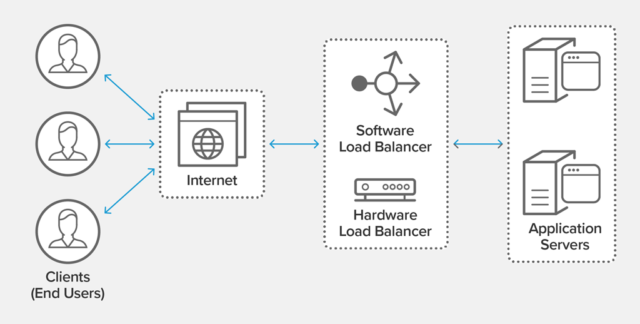
Load balancing methods
There are different ways of load balancing:
Round Robin – Requests are distributed across the group of servers sequentially.
Least Connections – A new request is sent to the server with the fewest current connections to clients. The relative computing capacity of each server is factored into determining which one has the least connections.
Least Time – Sends requests to the server selected by a formula that combines the fastest response time and fewest active connections. Exclusive to NGINX Plus.
Hash – Distributes requests based on a key you define, such as the client IP address or the request URL. NGINX Plus can optionally apply a consistent hash to minimize redistribution of loads if the set of upstream servers changes.
IP Hash – The IP address of the client is used to determine which server receives the request.
Random with Two Choices – Picks two servers at random and sends the request to the one that is selected by then applying the Least Connections algorithm (or for NGINX Plus the Least Time algorithm, if so configured).
Source: https://www.nginx.com/resources/glossary/load-balancing/
Types of load balancers - L4 vs L7
To understand Layer 4 vs Layer 7 load balancing. We must first understand the underlying concepts of the different layers of the _OSI Model_.
TLDR is that Layer 4 is the transport layer (i.e TCP, UDP) where the data segments contains information such the source and destination IP addresses/Ports and Layer 7 is the application layer (i.e HTTPS, Websockets) where the data contained in the segments is richer with application context and can be used to do smarter routing.
Layer 4 load balancing is used if the contents of data packets relevant to determine where to route the traffic. This means routing at layer 4 is much quicker. L4 load balancing is used with UDP-based applications such as video streaming, voice calls and core internet applications such as DNS, SNMP and DHCP.
Since Layer 7 load balancers inspect the content of data packets. They are able to route requests based on the information in those packets.
For example, a POST /video request can get routed to the backend server that is optimized to handle video uploading. This allows you to separate logic between servers. 'Separation of concerns'.
L7 load balancing can also be used to improve application security. A common application of L7 load balancing is Web Application Firewall (WAF). WAF can inspect the data packets and block malicious content from even reaching the backend servers.
One thing to keep in mind is that L7 Load balancer are more CPU intensive since they inspect every packet. Although modern load balancers such as Nginx rarely cause degradation if the load balancer is doing simple compute to route requests. A WAF may cause performance hits.